Managing Modern Data Sources for Compliance & eDiscovery guide
Learn information governance strategies for websites, team collaboration tools, & social media content
Want this guide as a downloadable PDF?

Introduction
The New Compliance and Discovery Landscape
As more companies embrace remote or hybrid work arrangements, existing information challenges are amplified, including the challenges of dealing with online data sources that are difficult to monitor and manage. As the workforce as become more dispersed with remote, hybrid and flexible working arrangements, many organizations have become dependent on online platforms to communicate — which means these data sources hold greater amounts of sensitive information than ever before.
Just consider internal team collaboration tools. Employees could be creating documents in Microsoft Office, G Suite, and countless other lesser-known solutions (like Dropbox Paper), and then sharing them through email and team collaboration tools, which includes everything from Slack, Workplace from Meta, and Microsoft Teams to Asana and Trello. And on top of that, they could be hosting (and recording) Zoom calls, during which sensitive information is discussed and displayed. Needless to say, keeping track of all of this can be tricky.
Mobile text messaging and instant messaging tools (like WhatsApp) offer a similar challenge. These are often used to share sensitive information both internally and externally, yet legal and compliance teams can struggle to gain access to these communications. What, for instance, would happen if an employee deleted a text message from their mobile device? How easy would it be to retrieve that content for a regulatory audit or legal matter?
These considerations extend to external-facing online sources like websites and social media channels as well. With more business and communication happening online, keeping track of online content is crucial but often tricky. A company website is a good example. It’s likely to exist on top of some kind of content management system (CMS), but might also have a section behind a user login screen with data hosted elsewhere. Then it could also have multiple forms that feed information to cloud-based sales and CRM solutions, as well as a chat bot from a third-party vendor.
As for social media, these platforms allow anyone to post a comment to an organization’s account—or to share sensitive information via direct messaging. As an example, someone might ignore requests to send an email or call a support center, and instead share their customer details directly through a social media platform. This introduces clear risks that should be mitigated through good information governance. But how can it be accurately collected and preserved—especially when social media content can be edited and deleted?
The CCPA, GDPR, and Other Privacy Considerations
Going hand in hand with the rise in online communication is a steady increase in privacy legislation. New legislation, like the General Data Protection Regulation (GDPR) and California Consumer Privacy Act (CCPA), are placing stringent demands on organizations when it comes to managing individuals’ data.
These regulations demand that organizations know exactly what user data they hold and what they do with it. Additionally, companies are expected to respond effectively to a Data Subject Access Request (DSAR) or Right to Erasure Request. In other words, organizations need to be able to identify relevant data right down to an individual subject—and this extends to web, social media, team collaboration and mobile text content.
Because of the above, Pagefreezer has created this white paper. It offers an Information Governance Lifecycle Model that aims to assist organizations in dealing with web, team collaboration, social media, and mobile text content. The model addresses proper management of online data throughout its lifecycle—through the stages of:
- Creation
- Retention
- Management
- Disposal
Before we dive into this, however, it is worth taking a moment to understand why online data can be challenging to collect and preserve.

The Challenges of Modern Information Governance
Despite the fact that organizations need to keep detailed records of online data for litigation and compliance, many still fail to do this effectively. Why? Well, modern electronic recordkeeping can be challenging, and many companies struggle to understand exactly what’s required.
While keeping records of official emails and discreet electronic documents is one thing, capturing dynamic online content is quite another. Enterprises are expected to maintain records of:
- Websites (including password-secured pages)
- Social Media Accounts (Facebook, Twitter, Instagram, etc.)
- Message Boards and Forums
- Enterprise Collaboration Content (Slack, Teams, Workplace from Meta)
- Text Messages and Messaging Apps (WhatsApp)
Doing this isn’t easy since content is constantly evolving—every passing minute brings more comments, replies, likes, and shares—and they all result in new electronic records. As an example, every new reaction or comment added to a social media post technically creates a new record. In other words, one Facebook post that sees a lot of engagement can result in hundreds of new records. And to make things even more complex, even deleted posts and comments should be collected to meet compliance and litigation needs.
Why Online Recordkeeping Is Hard
Here are some of the main reasons why organizations struggle to keep accurate records of online data.
Mix of Content
Message boards, forums, blogs, enterprise collaboration platforms, social media accounts, and instant messaging conversations don’t necessarily consist of one simple stream of content—they can have timelines, pages, direct messages, images, videos, comments, etc. This can easily lead to missing content and gaps in archives if not captured correctly. For instance, a screenshot of a social media or team collaboration post would obviously not capture a playable version of a posted video. A screenshot of a post could also miss crucial comments that have been collapsed and are not immediately visible under the post—and will offer no insight into edits and deletions.
Real-Time Activity
When it comes to electronic records management, social media channels and enterprise collaboration platforms are unique in the speed at which things happen. Thousands of comments, likes, and shares can happen in an hour, and with each new interaction, a new record is generated. This neverending real-time activity poses a tremendous challenge, since a record can be outdated almost the moment that it’s created. It’s also all too easy for a post to be edited or a comment deleted before an accurate record is created. And what would happen if content was ever to be deleted from the original platform? Would any record remain?
Evolving Platforms
Since a manual process like screenshotting is labor-intensive, can lead to incomplete records, and is unlikely to result in records that’ll satisfy a court or auditor, many organizations resort to some form of recordkeeping that collects social media data automatically. While this is a good approach, it’s worth keeping in mind that social media and team collaboration platforms are always evolving, so whatever solution an organization opts for, it needs to be able to adapt to platform changes. Otherwise, every platform change will result in lengthy downtimes and record gaps.
Integration Requirements
In order to ensure that social media content is always collected in real-time, that archives are of evidentiary quality, and that any changes to a platform will not impact the ability to archive data, it’s necessary to leverage platform APIs. By integrating their own applications with the APIs of these platforms, archiving vendors ensure that all necessary information is gathered. Gaining access to these APIs and building the necessary integrations isn’t always easy, but it’s undoubtedly the best way to ensure accurate records.
The Demands of Digital Evidence
Along with the complications of online data collection and archiving mentioned above, it’s also important to discuss what is required in order for digital information to be accepted by a court or auditor. An organization has to be able to prove the integrity and authenticity of any record provided, which means showing that the data hasn’t been tampered with—and demonstrating that it was indeed captured at the date, time, and URL stated.
Digital Signatures and Metadata
To prove data authenticity and integrity, an electronic record has to have the following:
- A digital signature (or hash value) that meets the Federal Rules of Evidence
- A Timestamp that shows the date and time that a record was collected
- All associated Metadata
What is Metadata?
Metadata is hidden data typically not visible to a user, or only visible in a limited capacity. If you examine the metadata associated with a social media post, for example, it contains:
- Client Metadata: Things like the browser, operating system, IP, and user that the information was collected from
- Web Server/API Endpoint Metadata: The URL, HTTP headers, type, date, and time of the request and response
- Account Data: The account owner, bio, description, and location
- Message Data: The author, message type, post date and time, versions, links, location, privacy settings, likes, comments, etc.
The EDRM and the Information Governance Reference Model
In order to help organizations better understand and manage the eDiscovery process, the well-known Electronic Discovery Reference Model (EDRM) was created in 2006.

The model outlines the steps typically involved in eDiscovery:
- Identify
- Collect
- Review
- Produce
- Preserve
- Process
- Analyze
- Present
But it does not only consider the steps of the eDiscovery process itself. On the left, the EDRM also attempts to address what’s needed in order to properly manage electronically stored information (ESI) for eDiscovery through the Information Governance Reference Model (IGRM).
Although these models can be immensely useful in managing data, there are very specific information governance considerations when it comes to online data like enterprise collaboration and social media content.
Pagefreezer’s Information Governance Lifecycle Model
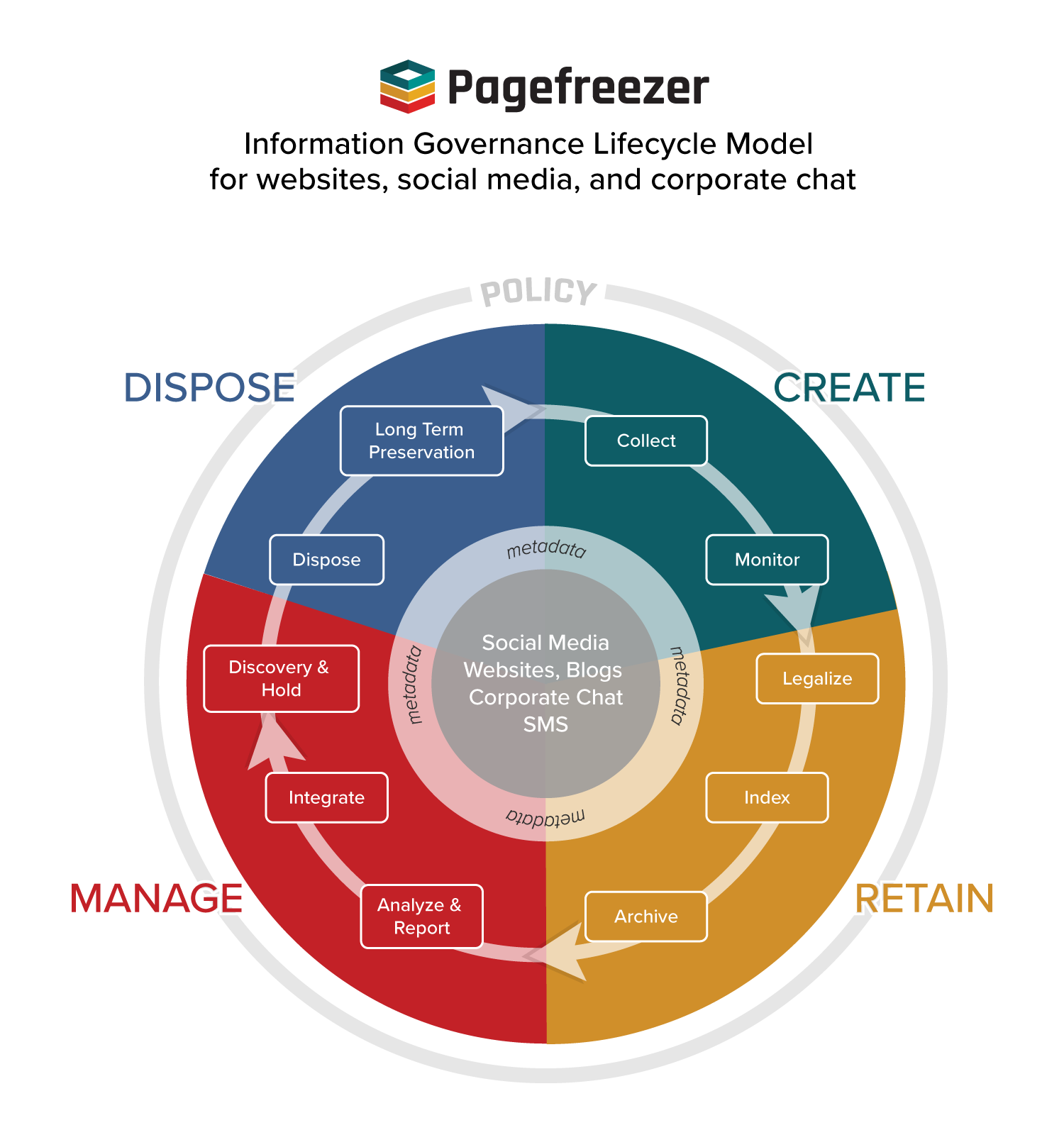
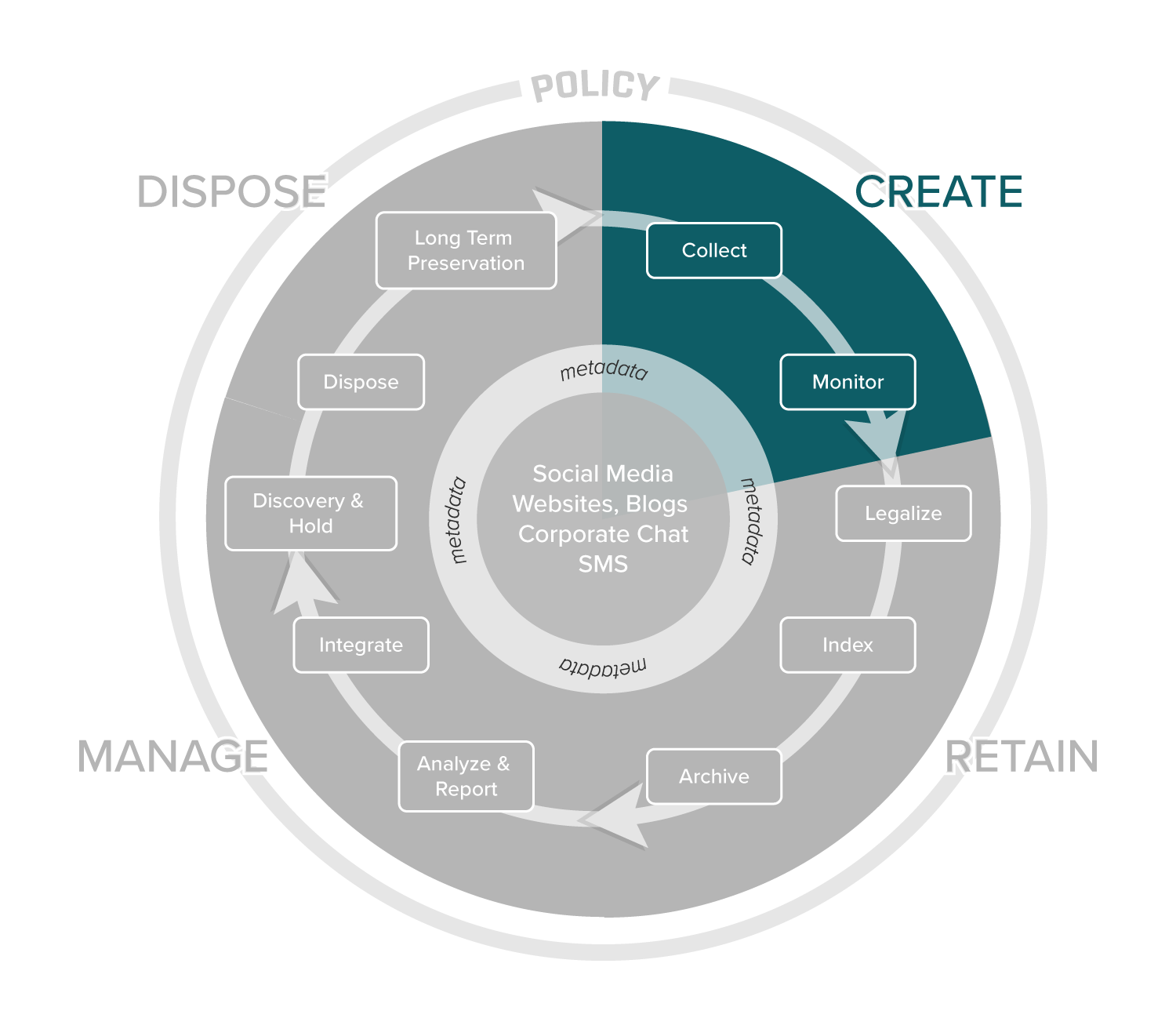
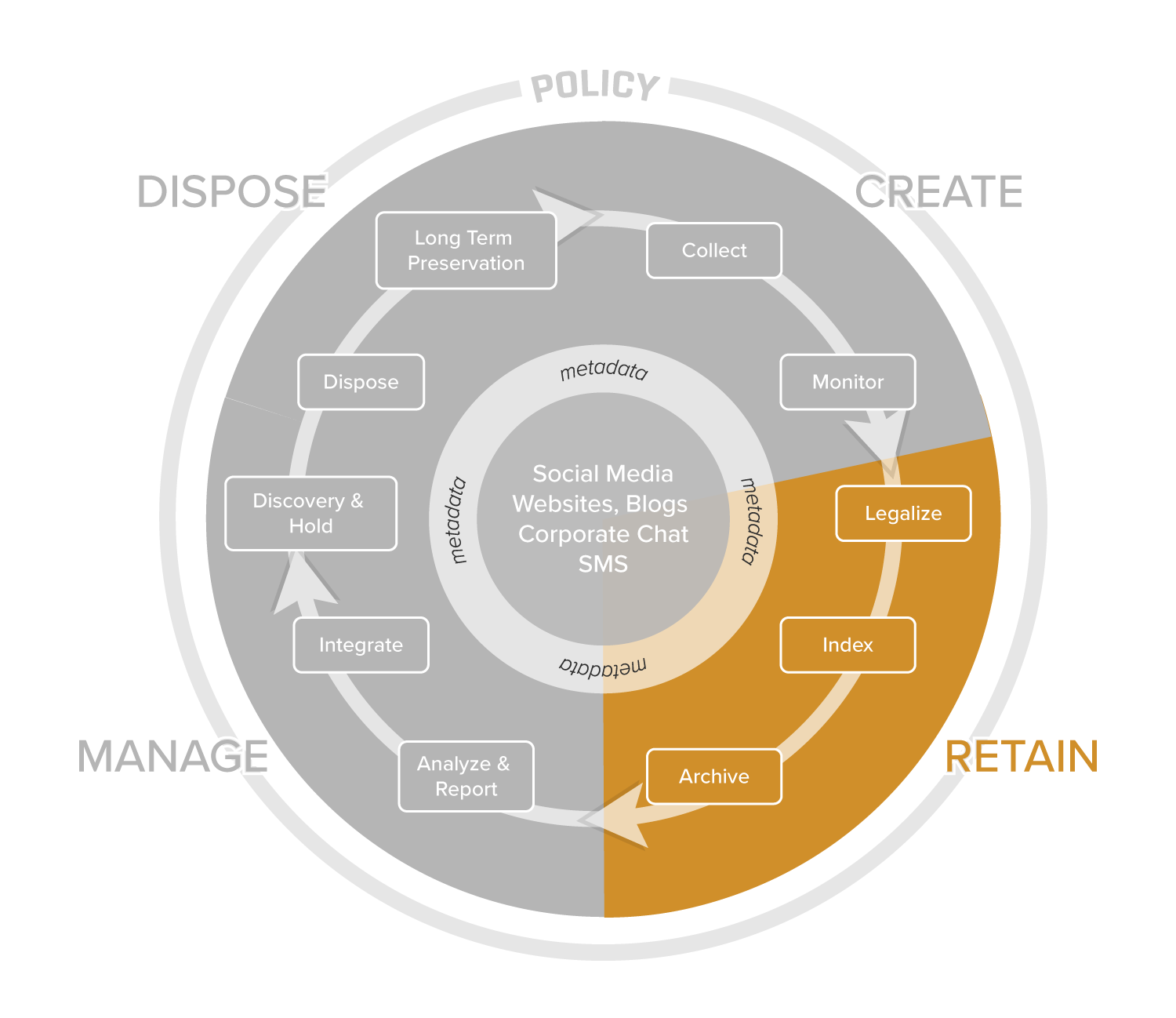
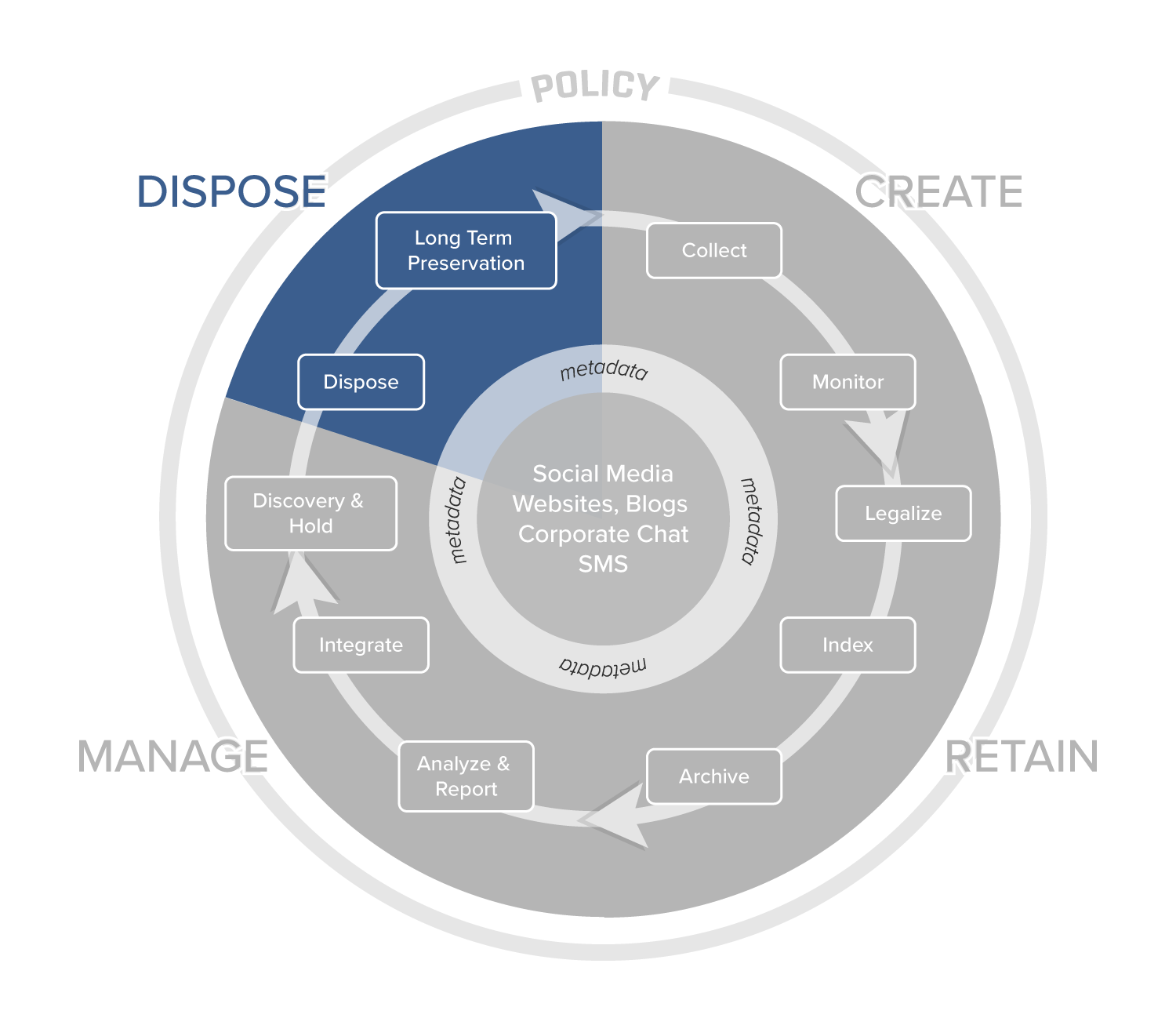
As mentioned earlier, Pagefreezer has expanded on the IGRM to provide enterprises with a comprehensive step-by-step guide to managing online records. This model breaks the IGRM down into four stages and 10 distinct steps that look like this:
Create
Collection
Electronic recordkeeping starts with the collection of data from sources such as websites, instant messaging apps, social media networks, and enterprise collaboration platforms. As mentioned, the collection of online content is complicated by the inherent nature of the data—the mix of content, constantly-evolving platforms, and real-time activity.
Social Media and Enterprise Collaboration
In order to address these challenges, organizations should be leveraging a solution that has API integrations with platforms like Facebook, Slack, and Twitter. This ensures that data is collected in real-time, and that all changes, deletions, and linked content are collected. Without an API integration that allows for real-time collection, there’s a high likelihood that crucial changes and communications would be missed, and that archives will consequently be incomplete. With API integration, there’s also the added benefit of being able to archive content retroactively—as long as the data is still available on the original platform, it can be collected and placed in an archive.
Websites and Blogs
When dealing with websites, data should be crawled on a regular basis to capture all additions, edits, and deletions across a site. Depending on how often website content is updated, it would typically be crawled once per day or once per week. Importantly, any solution that’s put in place should be capable of dealing with the latest complex sites. It should be able to capture client-side generated web pages by Javascript/Ajax frameworks, including Ajax-loaded content. It should also be capable of collecting multiple steps in web form flows, and capture webpage content that is displayed after a user event (if a section on a webpage loads additional content using Ajax after a user clicks).
Monitoring
The second component of the Capture stage is Monitoring. Due to the real-time nature of social media networks and enterprise collaboration platforms especially, it’s important for organizations to reduce risk by monitoring content in real-time. It should be done for two reasons: (i) preventing data loss and (ii) ensuring compliant, appropriate use of communication platforms.
Data Loss Prevention
There’s always the risk that an employee (or a member of the public) will share sensitive, private information on a social media channel or collaboration platform. To prevent this, organizations should have a system in place that notifies administrators when this kind of information is posted. If, for example, a home address is posted on Facebook, or a Social Security Number is shared on Slack, an alert should be sent to administrators to notify them of the situation and allow them to take quick action.
What is Data Loss Prevention (DLP)?
Data Loss Prevention refers to tools and processes that aim to prevent sensitive information from being leaked or accessed without proper authorization. Through a DLP process/strategy, information is classified according to its level of sensitivity, and based on this, policies are then put in place to prevent improper use and sharing of this confidential information. For instance, alerts might be sent out when this data (a password, home address, social security number, etc.) is shared in an email or on a corporate chat platform. In some cases, software can even prevent information from being typed into a social media or enterprise collaboration platform entirely.
Policy Compliance
For both external social media channels, like Facebook and Twitter, and internal chat platforms like Workplace from Meta and Slack, organizations should have a detailed policy in place that governs their use. Combined with this should be some form of monitoring solution that allows the organization to be alerted when something is posted that does not comply with the policy—if, for instance, someone makes a threat of physical violence or uses profanity.
Retain
Legalizing
This process relates to the capturing of data in a way that will make it defensible in a court of law or sufficient for a regulatory audit. As explained earlier in this document, this means gathering associated metadata of all electronic records and furnishing them with a timestamp and digital signature (hash value) that proves data integrity and authenticity.
While collecting and storing online data is important, and any organization actively doing it deserves to be congratulated, it’s important to do it in a way that results in records that would be defensible and reliable. So, simple screenshots would not be adequate, since they wouldn’t have the metadata and hash values needed.
Indexing
What differentiates an archive of online data from a basic back-up is the fact that properly archived records are indexed, meaning that the content is compiled in a way that makes it easy to search. So when a specific record needs to be found, all that’s required is a simple search and not a labor-intensive trawl through thousands of files. Properly indexed data also maintains relationships between data and users (allowing for the posts and comments of a specific user to easily be identified), and even allows metadata to be searched.
| Archive | Back-up | |
|
Full-text Search |
 |
X |
|
Digital Signatures |
|
X |
|
Easy access to archives |
|
X |
|
Live Replay |
|
X |
|
Metadata |
|
X |
|
Compliant data storage |
|
X |
|
Accessible |
Instant, 24×7 |
Takes hours |
|
Solution for |
Compliance, Legal |
IT |
Archiving
Once information has been captured, part of the retention process is placing that data in an archive. As stated above, this isn’t simply a back-up of online data, but is instead a database that is indexed and fully searchable.
Of course, while an archive is not merely a back-up of data, it is important to create back-ups of the archive itself. The data should ideally be replicated three times, saved to WORM (Write Once, Read Many) storage, and backed up remotely in the event of a disaster.
Another crucial component to consider when it comes to the archiving of data is security. In order to show compliance and successfully use data during litigation, the accuracy and integrity of the information should be beyond question. This will only be the case if the data is being archived in a secure way. Enterprises should aim to make use of a solution that is ISO 27001 certified and SOC 2 compliant.
Manage
Analysis and Reporting
Once online data has been archived, an opportunity exists to analyze that information and gain valuable insights. From looking at the number of average daily interactions a social media account has to understanding what posts and website campaigns perform best, a large archive of data makes it easier to take a big-picture view of online activity. While analysis is not crucial to thorough electronic recordkeeping, not leveraging archived data for useful insights is a missed opportunity.
Export and Integration
The last thing an organization should want when archiving data is to have it locked into proprietary software that doesn’t allow for the easy export of information. PDF is one popular form of export that should be available, but data should additionally be exportable in WARC format. It is also worth looking at the integrations offered by any electronic records management solution. Being able to export data to a public-sector compliance solution or eDiscovery platform can be immensely useful in streamlining workflows.
What is WARC?
Web ARChive (WARC) is a file format for the long-term preservation of digital data. It stores web pages and other digital resources including images and meta information in their original source code.
WARC has been accepted as an ISO standard (28500:2017), and since then, WARC has also been adopted by many software vendors, libraries, and government agencies across the globe as the new standard for digital records archiving, specifically for web pages and full websites.
The U.S. Government has also embraced this standard. NARA and the Library of Congress adopted WARC as the only acceptable file format for the long-term preservation of website and social media records according to Bulletin 2014-04, “Format Guidance for the Transfer of Permanent Electronic Records.”
Discovery and Hold
Speaking of eDiscovery exports and integrations, it’s important that online data like website and social media content be easily searchable, exportable, and processable for legal purposes—and that it can be ingested by eDiscovery platforms.
The ability to place a legal hold is another important consideration. Data doesn’t stay in an archive forever. Organizations can be expected to retain official records for anything from three to 10 years, and once that retention period is reached, information is often deleted. However, if the data is needed for legal purposes, this should be overridden to ensure that evidence isn’t lost. Any archiving solution should therefore enable the organization to easily place a page, post or conversation on legal hold to preserve it for litigation.
Dispose
Records Retention
As touched on in the previous section, data doesn’t remain in the archive permanently. All archived content has a disposition status, and unless something is on legal hold, that status is usually temporary. So as soon as it falls outside the period during which an organization is obligated to keep the information, the data may safely be deleted. Ideally, this process should be automated to ensure that data is never being kept if it’s not needed, while also reducing the workload that would come with manually deleting content on a daily basis.
Long-Term Preservation
It is increasingly common for both public and private-sector organizations to preserve social media and website content long-term, purely for the historical significance and institutional memory it represents. Because of this, a process should be put in place that allows the transfer of data from an archive to a long-term storage solution.
Solutions for Compliant Recordkeeping
To assist enterprises in collecting modern online data for compliance and eDiscovery, Pagefreezer offers a suite of products that simplify and automate the creation, retention, management, and disposal of data. Below are some enterprise solution highlights.
Data Loss Prevention and Monitoring
To ensure that activity on social media accounts complies with the organization’s social media policies, Pagefreezer lets you actively monitor conversations on your social media channels or enterprise collaboration platforms based on a customized a list of keywords, pre-defined text and number patterns, profanity, or custom text patterns you want to keep an eye on.
See all Content in Context
Archived content is presented in the original look and feel. Next to each social media message, for instance, the interface displays the metadata for that message and the history of all changes. Pagefreezer displays all message types, images, comments, and replies to comments in the same way as they appeared on the original social media platform.
Never Miss a Change Again
As pages, posts, and messages can be changed and have multiple versions over time, Pagefreezer has a user-friendly way to access different versions. Every message or comment that has multiple versions is indicated with a blue icon showing the number of versions. Deleted content is highlighted in red, with deletion date and time clearly shown. Changes/additions are shown in green.
Find What You Need in One Platform
Pagefreezer comes with a powerful full-text search engine that allows users to easily find specific archived pages, messages, and social media posts. This makes eDiscovery and general content collection much easier, ultimately saving time and money. Users can search by keywords, phrases, boolean operators, social media networks, accounts, and date ranges.
Exports that Work for your Business Processes
Archived content can be exported in PDF or WARC through the Pagefreezer dashboard. Specific social media accounts, selections of messages, open records cases, or even a complete account archive can be exported. The exports include all selected messages and conversation threads, as well as associated metadata.
Incontestable Evidence
For digital records to be accepted in court, you must be able to prove their authenticity and integrity. Pagefreezer meets the standards for digital evidence and facilitates the legal hold process by stamping each archived page with an RFC 3136 compliant TimeStamp Authority and a SHA-256 digital signature.
Collect Content Related to a Case
In the Pagefreezer dashboard, users can create ‘cases’ in which they can collect relevant records. While reviewing archive records or searching, individual posts and messages can be added to a case. Once all records have been selected, the case can be printed or exported to a file that includes relevant messages, conversation threads, and associated metadata. Data can also be ingested by eDiscovery platforms for further processing and preparation.
Align With Your Retention Scheduling Policies
Pagefreezer offers retention scheduling to automate the disposal of data and simplify alignment with your organization’s record retention policies. Should it become necessary, removed records can also be recovered within 30 days. To ensure that organizations have complete oversight of all user management activity, data viewed, exported and disposed of, Pagefreezer audit logs provide detailed information of all activities related to archives, including destruction activities.
Easily Place Content on Legal Hold
Any web page, social media post, comment, or conversation can be flagged and placed on legal hold, overriding the retention schedule to ensure records remain available. To support your team with legal holds, users can flag online records that are relevant and add them to a Case Folder. Cases can then be exported with the same look and feel as the original social media network, simplifying use during legal proceedings.
See Pagefreezer in Action
Are you looking for website, social media, or Microsoft Teams recordkeeping solutions for information governance, eDiscovery or compliance? Let us show you how we’re helping 1800+ organizations streamline their workflows and get peace of mind knowing every post, edit, and change is captured and preserved.

support@pagefreezer.com
Mailing Address
408-55 Water Street - Unit 8327
Vancouver, BC V6B1A1
Canada
Europe Office:
Van Leeuwenhoekpark 1 - Office 5
2611 DW, Delft
The Netherlands
UK Office:
+44 20 3744 7173
Australia Office:
+61 (07) 3186 2199
Subscribe to our Blog
Get targeted Industry news, great tips and valuable insights